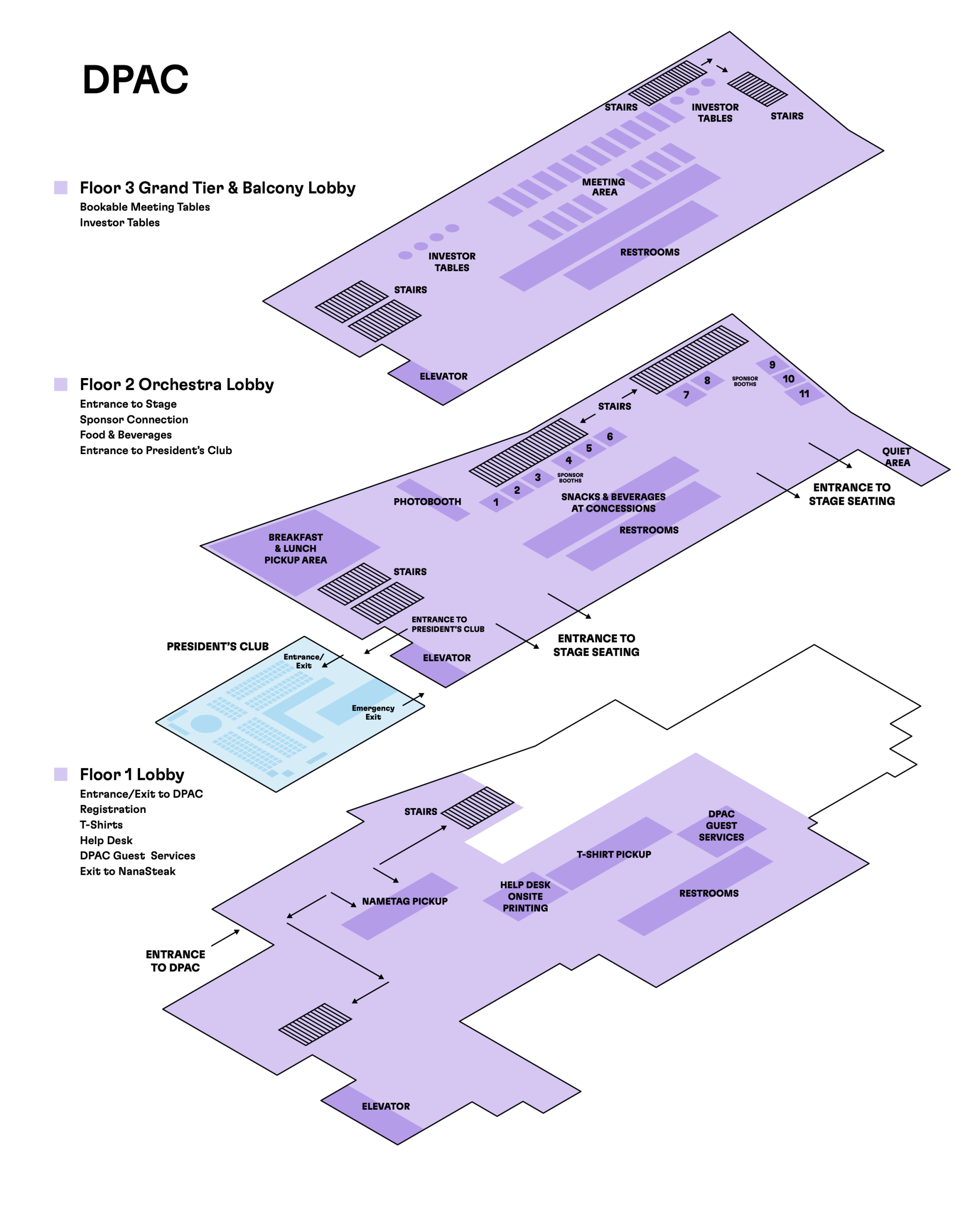
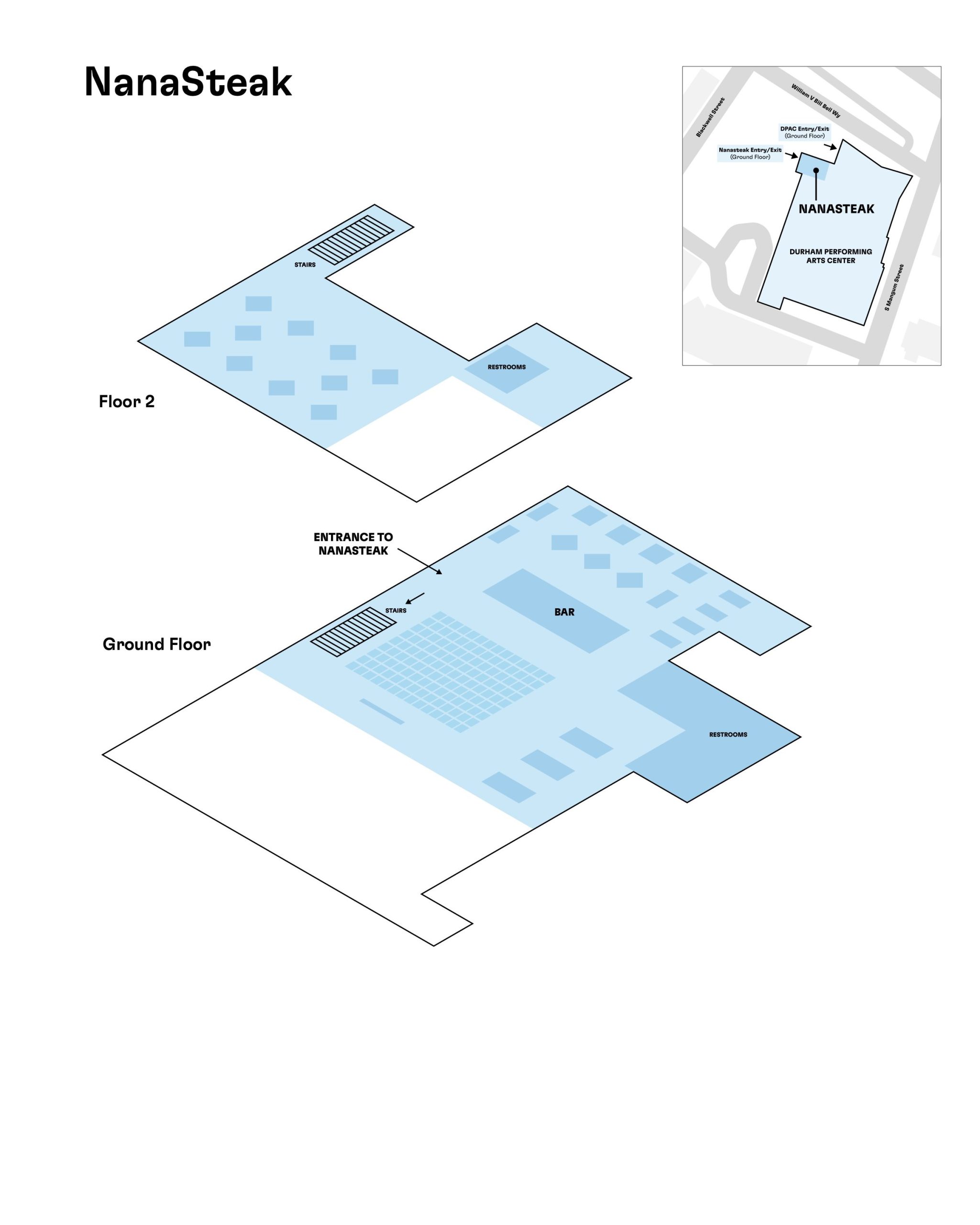
VC26 LOCATIONS
This year’s conference is being held at the Durham Performing Arts Center (DPAC): 123 William V Bill Bell Way, Durham, NC 27701 with side content at NanaSteak: 345 Blackwell St, Durham, NC 27701.
All attendees will enter through the main entrance of DPAC. Doors open at 7:30am and programming begins at 8:30am. Take a look at the full agenda for more info.
WHERE TO PARK
For Uber/Lyft rideshare, pick up and drop off passengers at the clearly marked “Pickup/Drop-Off” tent located near the DPAC entrance for your convenience.
Free parking is being offered on Tuesday & Wednesday at the American Tobacco North Deck (305 W Pettigrew St, Durham, NC 27701). Guests may enter the North Deck lot using the ramp on the Pettigrew street side. The gate will be lifted on the lane furthest to the right for entry. Guests MUST park on Levels 2 or above.
Other parking deck recommendations are below:
- East Parking Deck (250 S Mangum St, Durham, NC 27701)
- 555 Mangum Street Deck (555 S. Mangum Street, Durham, NC 27701)
For more information, please visit the DPAC website.
CONNECT TO WIFI
Once on-site, you can connect to the public wireless access point. In the DPAC Main Stage theater, the WiFi is: CED password: ventureconnect26
NEED SOME HELP?
The DPAC Guest Services Team is available to provide comprehensive support with first aid, coat check, lost and found, and accessibility needs. You can find DPAC staff in the First Floor Lobby at the Guest Services Kiosk.
The Help Desk will have CED staff and volunteers present to help with the agenda, event app access, and other conference questions you may have once on-site. Find us on the First Floor Lobby!
USING EVENTIFY
📲 Downloading the App
- Make sure you’ve got the Eventify app
- When prompted to search for an event, type Venture Connect.
- Click on Venture Connect.
- You will see a brief overview page about the event. Click “View More.”
- The Venture Connect loading page will appear.
- Once loaded, you will enter the event dashboard.
🔐 Setting Up Your Account
Important: You must be registered for the event on the admin side before logging in.
- Tap the three-line hamburger menu in the top-left corner.
- You will see a message that says “Hey there, tap to log in.”
- Click to log in.
- Enter your email address.
- Accept the Terms & Conditions.
- A login passcode will be sent to your email from VentureConnect 2026.
- Copy and paste the passcode into the Eventify app.
- Accept notifications when prompted.
- You are now logged in.
👤 Setting Up Your Profile
- Go to My Profile.
- Tap the pencil icon in the top-right corner to edit.
- Upload:
- Profile picture
- Cover photo
- Fill in:
- First & last name
- Short bio
- Company & position
- Social media links
- Enable Networking Consent*
- This allows other attendees to view your profile and connect with you.
- *If you disable this feature, attendees will not be able to schedule meetings with you
- Click Save.
💬 Scheduling Meetings
- Go to the Attendee List.
- Select the person you would like to meet with.
- Click “Let’s Meet.”
- Choose an available time slot and table.
- Confirm the meeting. Please note, all meetings at Venture Connect are double opt-in, meaning the other party has to accept your request.
- View all scheduled meetings under the Meetings tab.
📅 Managing Your Agenda
- Click the Agenda tab (found under Quick Links or in the hamburger menu).
- Browse sessions by date and time.
- Click sessions you would like to attend.
- Select Bookmark to add them to your personal schedule.
- You can:
- View the session time frame
- Add the session to your phone’s calendar
- Enable reminders
🏢 Company Lineup
- From the Home screen, select Company Lineup.
- View presenting companies that are pitching.
- Each profile includes:
- Company description
- Industry
- Social links
- Founder or contact information
- Click “View All” to sort by pitching categories.
📖 Event Guide
- Access the Event Guide section for:
- Information about CED
- Venue details
- Wi-Fi information
- FAQs
- Nearby restaurants
- Location details
- Additional helpful links
MAXIMIZE YOUR VC26 EXPERIENCE
Venture Connect is a two day event, March 24-25, 2026, with some pre-conference events on March 24th. This year’s schedule is jam-packed with company presentations and an incredible lineup of speakers. While it can be a lot to take in, we’ve got you covered with a timeline on how to best maximize your experience at VC26!
Let your Network Know!
Share with your network that you are looking forward to Venture Connect. And don’t forget to tag us @CED (Center for Entrepreneurial Development) on LinkedIn, and #VentureConnect2026, so we can like and repost.
Download the VC26 App
A primary goal at VC26 is to create the opportunity to build your network and make new connections that can accelerate your business. Be on the lookout for your Eventify event app login information, coming soon! Once you’re in, build out your profile and fill in your LinkedIn, so potential partners, peers, and/or investors can find you too!
Make a Plan
Are you looking to connect with potential partners, peers or investors? Research which ones will be the most important connection you can make at the event. Then use the app to schedule a meeting. We have designated meeting tables and unlimited casual meeting spaces. Make a plan and grab a drink or dinner with new friends that you meet on day one!
Arrive Early
Because there will be breakfast! Oh, and valuable networking time, too. With welcoming remarks kicking off at 8:30am, it’s always a good idea to get an early start (especially on Day One) to get a good parking spot, beat the lines, and get some great networking in before VC26 kicks off! Doors open at 7:30am.
Remember your Nametag
It might seem obvious, but it happens to the best of us! Make sure not to forget to bring your VC26 nametag on Day 2! You’ll need it to access the second day of Venture Connect.
DPAC & NanaSteak – Event Floor plans